- Published on
Education #1: Basic Multiplication Table
- Authors

- Name
- Rob
- @x
Introduction
The goal was to design a light, playful, and visually intuitive alternative to traditional ways of learning multiplication—something that would feel more like discovery than instruction. I wanted to create a simple, engaging tool that makes learning multiplication feel natural and enjoyable for young children.
The final outcome should serve as a gentle introduction to the world of multiplication, offering children a clear and visual way to begin their journey with numbers. Rather than relying on memorization alone, it presents multiplication through recognizable patterns that spark intuition and curiosity.
By turning numbers into shapes and patterns, it helps children see the logic behind multiplication in a way that’s both accessible and fun. At its core, the result is built on simplicity: no unnecessary complexity, just a clean, visual approach that encourages curiosity, builds confidence, and lays the foundation for strong future math skills.
Prompt
Please create a P5.js script directly embedded in HTML that interactively teaches children basic multiplication tables. Design a square composed of a grid. On the left and top sides of the grid, display numbers from one to ten. When a child clicks or touches, the intersection point of the selected numbers should display the result in the center of the grid.Use a minimalist animation style. Set a black background and a white grid. Upon clicking on the edge numbers, the intersection point representing the result should be highlighted in red-orange. Make the animation visually appealing and engaging for children.Below the grid, display the full equation, for example, "1x3=3". Animate the equation to appear nicely. When the edge numbers are changed, the equation should smoothly disappear and then reappear with the new calculation.
Output 1: Grok3 Single-Shot in P5.JS
Click on the numbers.
As can be seen, it was possible to achieve the desired result using only a single prompt using Grok3. The outcome can serve as a solid foundation for further development.
Taking Things to the Next Level
The result is good, but not entirely satisfactory, and there’s still room for improvement. After around 20 more prompts using ChatGPT, the outcome was refined into the following form.
Adjusted Output: ChatGPT Multi-Shot in P5.JS
The tool can be found here: Basic Multiplication Table
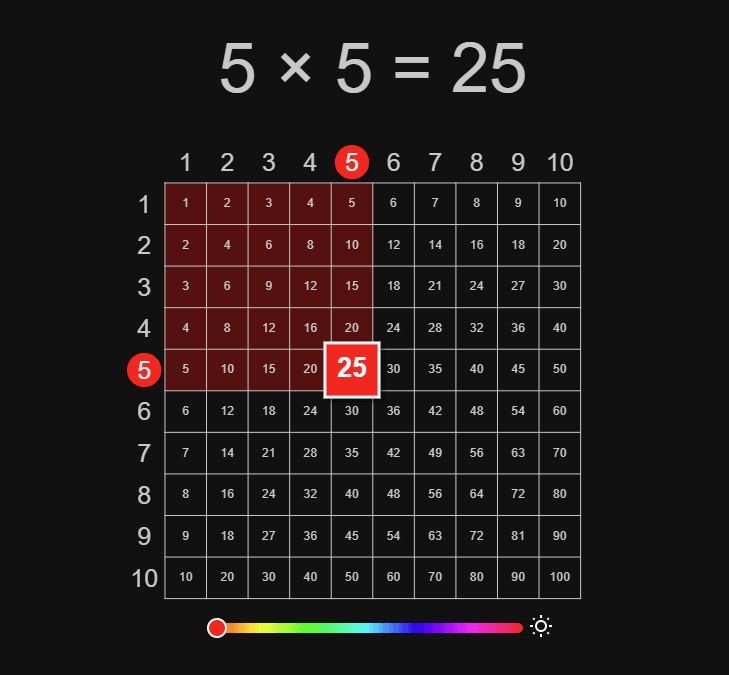
Click or tap on the numbers and grid to interact with the multiplication table. You can adjust the accent color and switch between light and dark themes.